Changelog
What’s new
The bigger changes to MEGA-METRO, newest first.
- New
Live follow is out of beta: it works offline, and you choose how you play
- Following runs on your phone or computer and your playing is never uploaded. Scores already read are kept on the device: those marked “Offline” in My scores open and follow with no network, in a practice room, backstage or on a plane.
- Three ways to play: in order (start to end, the cursor only goes on), anywhere (start again wherever you like after a stop), one passage (each stop takes you back to its first bar).
- When the same music is written elsewhere too (20 identical notes or more), that place is shown as well; the main cursor always follows you. Piano scores are still in beta.
- New
Tap the score on the start page: names, fingering, sharps and flats, chords
- Saint-Saëns, The Swan, cello part: tap any note for its name or a suggested fingering, or show every name, every fingering and the sharps and flats at once.
- A piano page with its chords under the staves: tap one to see its notes, and switch between chord names and Roman numerals.
- The cards that pop up are the same ones you get on your own score.
- Design
A calmer start page: one sample, one way in, and somewhere to go at the end
- “Load PDF” and “Load image” are one “Open your own score” button that takes either.
- The 30-second demo moved below the first screen and plays when you choose; it no longer starts by itself.
- A page footer with the other samples, scales, the user guide, release notes and privacy.
- On computers the Practice / Analyze / Edit switch moved into the top bar and the playback bar below is slimmer (44 px). The start page no longer shows the playback bar before a score is open, and it scrolls as a normal page, so End or the scrollbar takes you to the footer.
- On phones the metronome button sits in the bottom practice bar instead of floating over the page, and the empty status line on the start page is gone.
- Faint helper text is darker and easier to read on the paper background.
- Better
Chords between the staves and moved all at once; a bigger score in videos
- Harmony panel: place chords below the staves or between treble and bass.
- Tap a chord and tick “Select all chords” to move every chord together (wins over “every line's first chord”).
- Score over the video: the box height sets the score size and its width how many bars show; the row pans with the music, with blank space above and below trimmed.
- In videos the chord being played springs in, glows softly in its colour, and a fine line under it fills over its length.
- Better
Fixed: a score deleted and opened again was not saved to My scores; Tap sync works again
- A score deleted from My scores and opened again is saved again; if saving fails you now see a message.
- Tap sync: while the recording plays, press B (or Tap sync in Settings) on a bar's first beat and the cursor re-aligns from that bar.
- Better
Pick your cursor colour
- Settings → View → Cursor: Classic, Sky, Jade, Violet, Amber, Rose or Ink. The beat cursor and the bar shade change together, and the choice is remembered.
- Better
Performance videos: half the file size, a taller score box, a bigger window
- New Quality choice: “For sharing” (1080p) by default — the same 62-second video went from 46 MB to 24 MB; “Small file” is 720p, about 15 MB; “Best quality” keeps the most detail.
- With the score over the video, width and height are set separately: drag the right edge for width, the bottom edge for height. A taller box holds more rows, or a bigger single row.
- The export window is bigger: on a computer, a large preview on the left and the settings on the right.
- New
Performance videos: the score over your video; an eraser for scans
- When the take is a video, choose “Full frame, score over it”: the video fills the frame and the score plays on top of it — good for singers and players alike.
- Drag the score in the preview to move it and drag its corner to resize; set how see-through its paper is — fully clear, the notes float on the picture (white or dark, with a halo so they read on any picture). Kept for next time, separately for landscape and portrait.
- New eraser (Settings → Score → Eraser): one speck or pencil mark on a scan can make the reader skip a whole stretch. Wipe it, press “Read the wiped score”, and the wiped copy is read afresh.
- Better
Beat follow: every score, and more exact
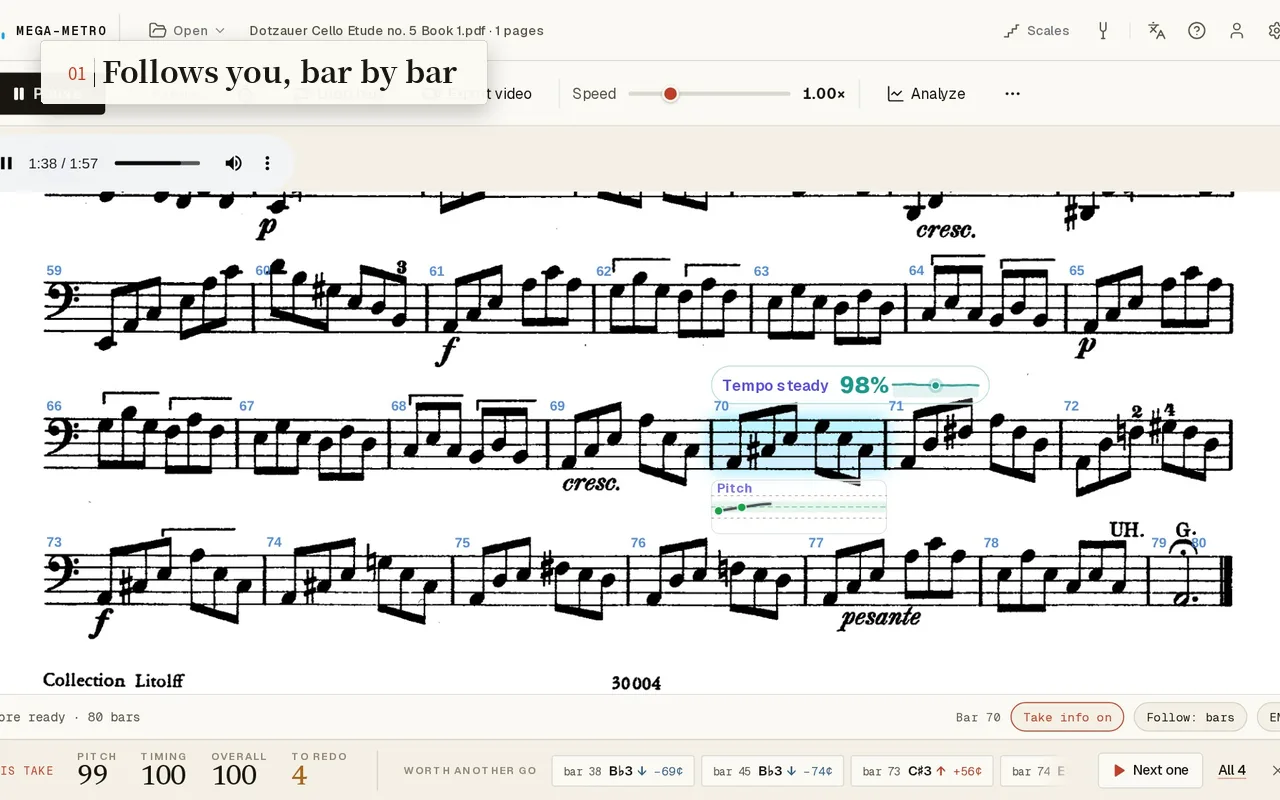
- Single-line scores (violin, cello, flute, voice…) get beat follow too: with just the metronome on, no take needed, the cursor lands on the notes beat by beat. With a take it still follows every note.
- Each beat is looked for at the height of its own notes, so stems, beams, accents and accidentals no longer pull it off. Checked against scores whose notes are placed, 98% of beats sit on their note; about 2% are off by more than a staff space.
- When a bar line or two is misread on the page (a double bar, a repeat sign), beats are no longer dropped for the whole score: bars are paired with the boxes by their notes. About half of piano scores had no beats for this reason; now nine in ten do.
- New
Performance videos: one big row, frame rate, bigger chords, your video on top
- Pick “One row, bigger” for the score: one row at a time, up to twice the size, panning along with the music, easy to read on a phone.
- Choose the frame rate: auto, 24, 30 or 60 fps.
- Piano chord labels are 1.5× by default in the video (or as on the page, or 2×), and each one pops in larger before settling.
- When the take is a video, put its picture on top with the score playing below it, like a music video or a lesson.
- New
Piano scores follow beat by beat
- After analysing a take on an uploaded piano score and choosing “Follow with this take”, the cursor now follows by beats: spanning the grand staff, it glides with each beat you play to the column where its notes are printed, instead of sweeping evenly from the bar line. Switch between beats and bars on the practice bar. Any score with a piano in it (a song with piano, say) follows the piano's beats, whether the take is voice, violin or piano.
- Better
A few small conveniences
- The Open, Settings and More menus close when you tap anywhere else on the page.
- Press Y to open or close the performance analysis.
- The bar-number switch moved from the metronome dial to the practice bar.
- Better
Accompanied scores: read and followed better
- With “Follow only, no scores” ticked and a piano part in the score, the take is lined up with the whole score (solo + accompaniment), so accompanied singing or playing lines up bar by bar for a score video; if that fails, the solo line alone is used. Without it, an accompanied take gets a one-tap offer to switch.
- When a page that opens with a piano-only intro came back as a row of empty bars, every later bar number was off. Such a page is now cut into its lines and read again, so the bar numbers match the printed score.
- When a take does not line up with the score, the result says so first and offers one-tap fixes: follow only with the whole score, switch to piano, or mark the bars by hand. Scores estimated from the tempo fold away, the report does not pop up, and the take stays out of your practice history.
- Better
Piano harmony that follows the piece’s harmonic rhythm
- Auto density no longer changes chord on every beat: it first finds how often the whole piece changes harmony, and a faster change has to earn its label.
- Broken chords are read as a whole: a left hand of C♯ E G A G E is now one A7/C♯ (V65/V), not A/C♯ then Em/G.
- Passing notes and appoggiaturas in the melody are not chord tones, and a key that lasts only a few bars is numbered in the main key.
- Same music, same chords: a repeated bar or a progression heard before is labelled the same way again, while the notes actually played always win (a Picardy third stays major).
- New
Chord labels: your typeface and size, editable, exportable
- Pick a plain, printed, italic or rounded face, size from 60% to 180%, and no backing, white or frosted glass.
- Tap a chord on the score to rewrite it, delete it, or nudge it left, right, up or down off a pedal mark; changes stay on your device and can be undone.
- Labels line up with the noteheads of the bass staff (placed by beat where no filled head is found; can be turned off).
- Tap the first chord of a line and tick “Select every line’s first chord” to move the first chord of every line on every page together.
- Export the score with its chords as a PDF from the analysis panel, ready to print.
- New
A gallery of marked pages
- One cello page four ways — original, note names, fingering, sharps and flats in colour — with a divider to drag against the original.
- Plus three uploaded scores: Saint-Saëns’ The Swan with note names, Scarlatti’s K.466 with Roman-numeral harmony, and Schubert’s Serenade with chord symbols.
- Nothing is retouched: names, fingering and sharps are the app’s marked-PDF export; the harmony is a screenshot of the score view.
- Design
A new look: ink and paper
- Warm paper, ink type and a vermilion accent, with a serif for headlines.
- The home page now opens with a 30-second demo of the real app.
- Two rows on top: the menu and the practice bar. The recording's progress line sits in the practice bar; drag or tap it to jump.
- Choose how to play: in place, or full screen with a smooth transition.
- New
Result strip: the notes worth another go
- Your take's results sit in a strip under the score: pitch, timing and the notes to redo.
- Tap a note chip to jump back and hear it again.
- New
Note names, fingering and sharp/flat colouring
- Tap a note for its name card: syllable, octave, its neighbours and where it sits on the keys.
- The fingering card draws the strings and where the finger lands; notes with no printed finger get a suggested one (beta, computer only).
- Mark every name or finger on the page, colour the sharps and flats, and export the marked score as a PDF saved only on your device.
- Better
Faster samples, and a shelf for your scores
- Sample recordings are now streamed m4a: 6.9 MB down to 2.4 MB.
- My scores is now a shelf of covers.
- Better
Scanned scores: deep bar-line repair
- After a scanned score loads, the server reads its bar lines again and tells you what it fixed.
- Faint old scans now keep their bar lines.
- New
Follow along with accompanied recordings
- The cursor can follow a take with piano accompaniment, or someone else's performance (these takes aren't scored).
- New
Scales: arpeggios, minor keys and viola
- Record without the metronome.
- The scales page adds arpeggios, minor keys and viola, with a live note strip and a tuner.
- New
Help pages
- Every feature explained with pictures, plus a FAQ.
- New
Chord symbols for piano
- Piano scores get chord symbols bar by bar between the staves.
- Better
The solo part, picked for you
- In a cello-and-piano score, the solo line is found and followed automatically.
- New
Your dashboard, and picking PDF pages
- Your page: practice time, a calendar and scores for each piece.
- When loading a PDF, tick the pages and drag a box around the part you want.
- Record with the metronome, using the dial's tempo and count-in.